Evidence-based guide
Best AI Journal Apps in 2026: 10 Apps Compared
Compare 10 AI journal and knowledge apps by voice capture, search, privacy, platforms, free plans, export, and the kind of journaling each workflow fits.
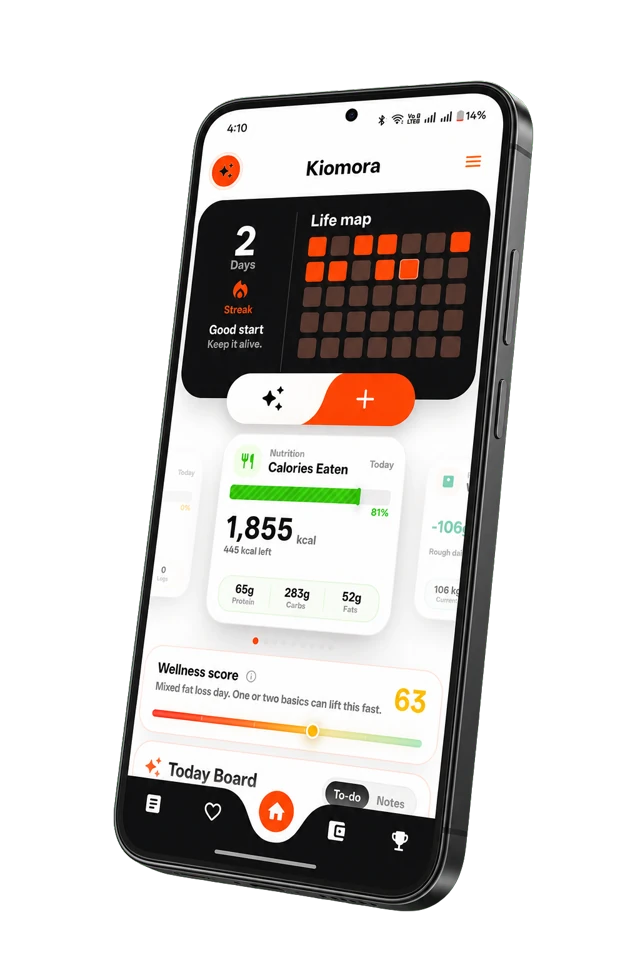
Kiomora for structured journaling
One update. More context.
Use text, voice, or a photo to create reviewable daily logs across the parts of life you choose to save.
Explore KiomoraDisclosure: We build Kiomora. It is included in this comparison. We have intentionally highlighted situations where competing products may be a better fit depending on your goals.
How this guide was checked: Product details were reviewed against official provider pages on July 28, 2026. This is a documentation-backed editorial comparison, not a hands-on performance test of every paid plan. Prices, platform support, and AI limits can change, so verify the current plan before paying.
A useful journal-app comparison needs to go beyond a feature list. The important questions are how quickly you can capture a real entry, whether you can find it later, what the provider documents about privacy, and whether you can take your data with you.
This guide takes a different approach.
We reviewed 10 journaling and personal knowledge management tools against the same editorial criteria: AI capability, input friction, privacy architecture, data ownership, pricing transparency, and long-term usefulness. The comparison relies on current provider documentation and clearly separates documented features from our editorial judgment.
Some of these tools are dedicated journal apps. Others are general-purpose platforms that people commonly use for journaling. We included both categories because that reflects how people actually choose their tools. A student deciding between Notion and Day One does not care about category boundaries. They care about which tool will help them reflect consistently without adding friction to their day.
If you want to understand the research and limitations behind the category, read our companion guide to AI journaling. For the broader practice of personal data tracking, start with what life logging is. This article assumes you have decided to journal and need to choose the right workflow; a broader AI life tracker may fit better when structured daily context matters more than long-form writing.
Quick recommendations by job
- Traditional long-form journal: consider Day One.
- Structured daily context from text, voice, or photos: consider Kiomora.
- Local files and customization: consider Obsidian.
- Built-in Apple journaling: consider Apple Journal.
- Fast mood and activity check-ins: consider Daylio.
- Journal plus knowledge management: consider Reflect.
These are workflow recommendations, not universal rankings. Use the comparison table and official provider links below to verify current features.
Table of Contents
1. What Makes an AI Journal App Different? 2. How We Evaluated These Apps 3. Quick Comparison Table 4. Detailed Reviews (10 Apps) 5. Feature Comparison Matrix 6. Privacy and Data Ownership Comparison 7. Which AI Journal App Is Right for You? 8. Data Portability and Long-Term Thinking 9. The Future of AI Journaling 10. Official Product Sources 11. Frequently Asked Questions 12. Conclusion
1. What Makes an AI Journal App Different?
A traditional journal app is a blank page. You open it, you write, you close it. The app stores text and maybe attaches a photo. That is the extent of its functionality.
An AI journal app adds a processing layer between your input and your archive. After you write or speak an entry, the AI analyzes the content and performs some combination of the following:
- Natural language parsing: Extracts structured data (mood, health symptoms, activities, people, locations) from unstructured text without requiring tags, dropdowns, or special formatting.
- Automatic categorization: Tags and files entries by topic, emotion, or domain without manual effort.
- Pattern review: Places entries from different dates together so a person can inspect possible associations. It should expose the underlying entries and avoid invented percentages or causal conclusions.
- Semantic search: Allows you to search by meaning, not just keywords. Searching for "times I felt anxious" returns entries where you wrote "nervous," "on edge," or "couldn't stop worrying" - even if you never used the word "anxious."
- Summaries and insights: Generates daily, weekly, or monthly digests that highlight recurring themes, mood trends, and behavioral patterns.
The difference matters because it addresses the two problems that cause most journaling practices to fail: consistency (AI reduces input friction to seconds) and retrievability (AI makes your archive searchable and analytically useful). For a deeper exploration of these problems, see our complete AI journaling guide.
Not every app on this list offers all of these capabilities. Some offer deep AI with limited journaling features. Others offer excellent journaling with minimal AI. The reviews below are specific about what each tool actually provides.
2. How We Evaluated These Apps
Every app was assessed against the same criteria:
- AI Depth: What does the AI actually do? Summarize entries? Detect patterns? Parse natural language? Generate insights? There is a wide spectrum between "we added a chatbot" and "the AI fundamentally changes how journaling works."
- Input Friction: How many seconds does it take to go from "I want to log something" to "it's logged"? This is the single most important predictor of whether a journaling habit survives.
- Voice Support: Can you journal by speaking? Is voice a first-class feature or an afterthought bolted onto a text-first interface?
- Search and Retrieval: Can you find a specific entry from six months ago? Can you search by concept, not just keyword? Can you ask questions about your archive?
- Analytics: Does the app visualize patterns, trends, and correlations over time?
- Data Export: Can you get your data out? In what format? How complete is the export?
- Privacy: Where is your data stored? Is it encrypted? Does the AI model train on your entries? Is the privacy policy clear and specific?
- Cross-Platform Support: Does the app work on the devices you actually use?
- Pricing: What does it cost? Is the free tier genuinely useful, or is it a demo?
These criteria do not matter equally to every person. Some prioritize writing, others export, local files, quick capture, accessibility, or structured review. Treat the matrix as a decision framework, then verify current product details and test the workflow yourself.
3. Quick Comparison Table
AI Journal App Comparison Matrix
| App | AI FeaturesAI | Voice InputVoice | Search | AnalyticsCharts | ExportExp | Free | PlatformsPlat |
|---|---|---|---|---|---|---|---|
| Kiomora | ✓Strong | ✓Strong | ✓Strong | ✓Strong | △Limited | ✓Strong | Android, iOS; Web reportsAndroid/iOS |
| Day One | △Limited | ✓Strong | ✓Strong | △Limited | ✓Strong | ✓Strong | iOS, Mac, Android, WebAll |
| Reflect | ✓Strong | ✓Strong | ✓Strong | ✗None | ✓Strong | ✗None | iOS, Mac, WebiOS/Mac/Web |
| Journey | △Limited | △Limited | △Limited | ✗None | ✓Strong | ✓Strong | All PlatformsAll |
| Daylio | ✗None | ✗None | △Limited | ✓Strong | ✓Strong | ✓Strong | iOS, AndroidMobile |
| Notion | ✓Strong | ✗None | ✓Strong | ✓Strong | ✓Strong | ✓Strong | All PlatformsAll |
| Obsidian | △Limited | ✗None | ✓Strong | △Limited | ✓Strong | ✓Strong | All PlatformsAll |
| Mem | ✓Strong | ✓Strong | ✓Strong | ✗None | △Limited | △Limited | Web, iOSWeb/iOS |
| Capacities | ✓Strong | ✗None | ✓Strong | ✗None | ✓Strong | ✓Strong | All Desktop, iOS, AndroidAll |
| Apple Journal | △Limited | ✓Strong | ✗None | ✗None | ✗None | ✓Strong | iOS, MaciOS/Mac |
Kiomora export note: “Limited” means Plus users can retrieve supported records through an authorized MCP client. It is not a complete self-service account archive.
4. Detailed Reviews
4.1. Day One
Overview: Day One is an established dedicated journaling app that first launched in 2011. It focuses on a polished traditional journal experience across supported platforms, with media, search, export, and plan-dependent AI features documented by the provider.Strengths:- An established journaling product with a focused writing interface.
- End-to-end encryption is available on all tiers, including the free plan.
- Rich media support: photos, videos, audio recordings, PDF scanning, and location data.
- AI features (Gold tier) include Daily Chat, entry summaries, title suggestions, and AI-generated images.
- Strong integrations: Strava activity imports, Zapier, IFTTT.
- Available on iOS, Android, macOS, and web.
- AI features are locked behind the most expensive tier (Gold, $74.99/year). The free and Silver tiers have no AI.
- No natural-language parsing for structured data. The AI summarizes and generates prompts but does not extract health, mood, or activity data from entries.
- The app is designed for long-form writing. There is no quick-capture or structured logging workflow.
- No analytics dashboard. You cannot visualize mood trends or health patterns over time.
4.2. Kiomora
Overview: Kiomora is a broader life-record app, rather than only a traditional AI journal. It gives you one place to save the everyday context you choose: journaling, wellness, habits, expenses, notes, meals, activity, mood, and progress. You can describe your day naturally in SuperLog; Kiomora suggests relevant logs, and you review what becomes part of your record.A core capability is Ask Kiomora, which allows users to quickly query their stored life data. Instead of scrolling through timelines, you can ask questions across your activities, expenses, meals, habits, notes, and mood to easily retrieve past events and memory insights.
Strengths:- Lower-friction entry through a natural text or voice update, with review time varying by the amount of detail and any corrections needed.
- The AI parsing is genuinely useful. It extracts multiple data categories from a single entry without requiring tags, dropdowns, or structured input.
- Cross-domain tracking. A single entry can simultaneously log mood, meals, exercise, sleep, and spending. Most competitors require separate apps or manual categorization for each domain.
- Voice journaling is a primary feature, rather than a secondary input method.
- Automatic dashboard generation. Unstructured entries become visual charts without manual setup.
- Available on Android and iOS, with Monthly Reports also accessible on the web.
- Newer app with a smaller community and ecosystem compared to established competitors.
- Long-form reflective journaling is not its primary use case. It is optimized for structured life logging over extended prose.
4.3. Reflect
Overview: Reflect (reflect.app) is a networked note-taking tool with daily journaling built into its core workflow. It sits at the intersection of journaling and personal knowledge management, with backlinks, a knowledge graph, and AI features powered by GPT-4 integration.Strengths:- AI integration is deep and embedded throughout the app. It can summarize notes, generate connections, and answer questions about your archive.
- Networked notes with backlinks allow you to build a personal knowledge graph over time, connecting journal entries to projects, people, and ideas.
- End-to-end encryption by default. Your data is encrypted before it leaves your device.
- Calendar integration pulls schedule context into daily notes automatically.
- Clean, distraction-free interface.
- No free plan. After a 14-day trial, it costs $10/month ($120/year), which makes it one of the more expensive options.
- No Android app. Available on iOS, macOS, and web only.
- Designed primarily for note-taking and knowledge work. The journaling workflow exists but is secondary to the PKM system.
- No structured data extraction or analytics. The AI assists with writing and search but does not parse entries into health, mood, or activity data.
4.4. Journey
Overview: Journey is a cross-platform journaling app notable for its availability on virtually every platform: Android, iOS, macOS, Windows, Chrome OS, and web. It emphasizes guided journaling through coach programs and templates.Strengths:- The widest platform support of any dedicated journal app. Works on Android, iOS, macOS, Windows, Chrome OS, and web.
- End-to-end encryption available.
- Coach programs provide structured journaling guidance for specific goals (gratitude, mindfulness, stress management).
- Supports Google Drive and custom cloud storage for data backup.
- Supports media attachments including photos, videos, and audio.
- AI features are limited compared to newer competitors. No natural-language parsing or pattern detection.
- The interface can feel dated compared to more modern competitors.
- The coaching templates, while useful for beginners, can feel formulaic for experienced journalers.
- Search is basic keyword matching, not semantic.
4.5. Daylio
Overview: Daylio is a micro-journaling and mood tracking app designed around icon-based input rather than writing. You select a mood level and tap activity icons to log your day. It is the lowest-friction traditional journaling app, but it contains no AI features.Strengths:- The fastest manual input of any journaling tool. A complete entry takes 5-10 seconds.
- Excellent mood and activity correlation statistics. The app shows you which activities are associated with your best and worst moods.
- No writing required. This makes it accessible for people who dislike or struggle with written journaling.
- Data stored locally on device by default, which is strong for privacy.
- Available on iOS and Android.
- No AI features of any kind. No natural-language parsing, no pattern detection beyond basic correlations, no semantic search.
- No voice input.
- Entries lack depth. Tapping mood icons and activity buttons produces useful data but sacrifices the reflective, narrative quality that makes journaling therapeutically valuable.
- No web or desktop app.
- Export options are limited.
4.6. Notion
Overview: Notion is a general-purpose workspace tool that many people use for journaling through custom database templates. With the addition of Notion AI (GPT-4-class models, Claude, and Gemini), it now offers AI-powered writing assistance, summarization, and Q&A across your workspace.Strengths:- Maximum flexibility. You can design any journaling system you want: daily templates, mood databases, habit trackers, media galleries.
- Notion AI is powerful for general-purpose Q&A and summarization. You can ask questions like "summarize my journal entries from last week" and get coherent responses.
- Agentic AI capabilities (2026) allow Notion to autonomously execute multi-step workflows, pull data from connected apps (Slack, Google Drive, Jira), and populate databases.
- Enormous template ecosystem. Thousands of journaling templates built by the community.
- Available on iOS, Android, macOS, Windows, and web.
- High setup friction. Building a journaling system in Notion requires creating databases, configuring properties, and maintaining templates. This is a feature for power users and a barrier for everyone else.
- High input friction. Each journal entry requires creating a new page, selecting a database, and filling properties before you can start writing.
- Notion AI is a general-purpose assistant, not a journaling-specific tool. It cannot parse natural language into structured health or mood data.
- Notion AI costs extra: approximately $8-10/month as an add-on for Free and Plus plans. Included with Business ($20/month) and Enterprise plans.
- Overkill for pure journaling. The most of Notion's features are irrelevant to someone who just wants to write daily reflections.
4.7. Obsidian
Overview: Obsidian is a local-first, Markdown-based note-taking app with a massive plugin ecosystem. It has no built-in journaling or AI features, but community plugins (Daily Notes, Periodic Notes, AI Journal Coach, Smart Connections) can transform it into a powerful journaling system with AI capabilities.Strengths:- Complete data ownership. All notes are stored as plain Markdown files on your local device. No vendor lock-in.
- The plugin ecosystem is enormous. Community plugins can add AI-powered journaling, mood tracking, pattern detection, and knowledge graph visualization.
- Free for personal use. No subscription required for the core app.
- Works offline by default. No internet connection required for core functionality.
- Graph view lets you visualize connections between entries and topics.
- Available on iOS, Android, macOS, Windows, and Linux.
- Requires significant setup. There is no journaling system out of the box. You must install and configure plugins, create templates, and build your own workflow.
- AI features require third-party plugins and separate API keys (OpenAI, Anthropic, etc.), adding cost and complexity.
- The learning curve is steep. Obsidian is a power-user tool that rewards investment but punishes casual users.
- Sync across devices requires Obsidian Sync ($4-8/month) or a third-party solution like iCloud or Syncthing.
- No built-in analytics or visualization. Plugins can add these, but configuration is manual.
4.8. Mem
Overview: Mem (mem.ai) is an AI-native note-taking app that uses AI as its primary organizational mechanism. Instead of folders and tags, Mem uses AI to automatically organize, surface, and connect your notes. It is designed for people who want to capture thoughts quickly and let the AI handle retrieval.Strengths:- AI-first design. The app is built around AI from the ground up, not retrofitted with AI features.
- Automatic organization. No folders, no tags. The AI organizes your notes based on content and context.
- Strong search. You can ask natural-language questions about your notes and get direct answers.
- Meeting briefs and related note surfacing provide proactive, useful AI assistance.
- Fast capture with minimal friction.
- Designed for professional note-taking and knowledge work, not personal journaling. The feature set is optimized for meeting notes, research, and work output.
- Restrictive free tier: 25 notes/month, 25 chat messages/month.
- Limited platform availability. Web and iOS only.
- No voice journaling features.
- No mood tracking, health parsing, or personal analytics.
- Relatively expensive for personal use: $12/month for Pro.
4.9. Capacities
Overview: Capacities (capacities.io) is an object-based note-taking tool that treats every piece of information as a typed object (person, book, meeting, journal entry) rather than a generic page. It has a dedicated daily notes feature and an AI assistant available on the Pro tier.Strengths:- Object-based architecture gives structure to your information without rigid folder hierarchies. A journal entry can be linked to people, books, projects, and other typed objects.
- Daily notes feature provides a clean journaling interface.
- AI assistant (Pro tier) can summarize, generate, and answer questions about your content.
- Beautiful, clean interface with strong design sensibility.
- Free tier is generous: unlimited spaces, objects, and blocks; 5GB media storage; full import/export.
- 40% student discount on paid plans.
- AI features require the Pro tier ($9.99-11.99/month).
- The object-based paradigm has a learning curve. It is conceptually different from traditional note-taking and may confuse users who expect a simple journal app.
- No dedicated mobile app optimization for quick journal capture. The mobile experience is functional but not optimized for 10-second entries.
- No voice journaling or natural-language health/mood parsing.
- Smaller ecosystem and community compared to Notion or Obsidian.
4.10. Apple Journal
Overview: Apple Journal is Apple's built-in journaling app, introduced in iOS 17 (2023) and expanded to iPad and Mac in late 2025. It uses on-device intelligence to generate personalized writing prompts based on your photos, music, location, and activity data.Strengths:- Free on supported Apple devices, with no separate journal subscription.
- Apple documents device authentication, encrypted transfer and storage for iCloud sync, and encrypted local backups. Exact protection depends on the device and account settings you use.
- Contextual prompts are genuinely useful. The app suggests journaling topics based on places you visited, photos you took, music you listened to, and workouts you completed.
- Entries can be protected with a device passcode, Face ID, or Touch ID.
- Apple documents search, filters, calendar browsing, audio attachments, and export workflows.
- Apple ecosystem only. No Android, no Windows, no web.
- Its intelligence is centered on prompts and suggestions, not semantic questions across your archive or cross-category life analytics.
- Search and filters are available, but Apple does not document semantic question answering across entries.
- Export and PDF workflows exist, but the resulting structure may not suit every migration or analysis workflow.
- Audio can be attached to entries, but this is different from cross-category voice life tracking.
- Customization and structured analytics are limited compared with database or life-tracking tools.
5. Feature Comparison Matrix
AI Journal App Comparison Matrix
| App | AI FeaturesAI | Voice InputVoice | Search | AnalyticsCharts | ExportExp | Free | PlatformsPlat |
|---|---|---|---|---|---|---|---|
| Kiomora | ✓Strong | ✓Strong | ✓Strong | ✓Strong | △Limited | ✓Strong | Android, iOS; Web reportsAndroid/iOS |
| Day One | △Limited | ✓Strong | ✓Strong | △Limited | ✓Strong | ✓Strong | iOS, Mac, Android, WebAll |
| Reflect | ✓Strong | ✓Strong | ✓Strong | ✗None | ✓Strong | ✗None | iOS, Mac, WebiOS/Mac/Web |
| Journey | △Limited | △Limited | △Limited | ✗None | ✓Strong | ✓Strong | All PlatformsAll |
| Daylio | ✗None | ✗None | △Limited | ✓Strong | ✓Strong | ✓Strong | iOS, AndroidMobile |
| Notion | ✓Strong | ✗None | ✓Strong | ✓Strong | ✓Strong | ✓Strong | All PlatformsAll |
| Obsidian | △Limited | ✗None | ✓Strong | △Limited | ✓Strong | ✓Strong | All PlatformsAll |
| Mem | ✓Strong | ✓Strong | ✓Strong | ✗None | △Limited | △Limited | Web, iOSWeb/iOS |
| Capacities | ✓Strong | ✗None | ✓Strong | ✗None | ✓Strong | ✓Strong | All Desktop, iOS, AndroidAll |
| Apple Journal | △Limited | ✓Strong | ✗None | ✗None | ✗None | ✓Strong | iOS, MaciOS/Mac |
Kiomora export note: “Limited” means Plus users can retrieve supported records through an authorized MCP client. It is not a complete self-service account archive.
6. Privacy and Data Ownership Comparison
Local-First
Obsidian, Daylio
Pros:
- ✓ Data stored on your device
- ✓ Maximum ownership
- ✓ Offline access
- ✓ Zero dependency on server uptime
Tradeoffs:
- - Sync can require extra setup
- - AI features often require external services
- - Device damage or loss can cause data loss without backups
End-to-End Encrypted
Day One, Reflect, Apple Journal
Pros:
- ✓ Provider cannot read entries
- ✓ Strong cloud privacy
- ✓ Secure syncing
- ✓ Immunity to remote data leaks
Tradeoffs:
- - AI capabilities can be more limited
- - Some advanced analysis may require compromises
- - Lost recovery keys can lead to permanent data lockout
Cloud-Based
Notion, Mem, Capacities, Journey, Kiomora
Pros:
- ✓ Automatic sync across devices
- ✓ Server-side AI features
- ✓ Easier onboarding and backup
- ✓ Real-time processing
Tradeoffs:
- - Privacy depends on provider policies
- - Data handling practices vary by company
- - Requires internet connection for core features
Different architectures optimize for different priorities. Privacy, convenience, AI capability, syncing, and data ownership all involve tradeoffs. There is no universally correct choice, only the choice that aligns with your needs:
Local-first apps (Obsidian, Daylio) optimize for data ownership and offline access. By storing your data as files on your device, you retain maximum control. The tradeoff is that simple syncing across devices requires manual setup, and integrating AI features often requires managing external API keys.
Encryption claims need provider-specific verification. Products may protect different content, backups, attachments, metadata, or account states in different ways. Read each provider's current security documentation instead of assuming every entry and feature receives identical end-to-end protection.
Cloud-based apps (Kiomora, Notion, Capacities, Mem, Journey) can make account access, syncing, and server-side AI easier to provide. The tradeoff is that privacy, retention, reliability, and deletion depend partly on the provider's documented practices and the specific feature being used.
AI data handling: Ask where journal text is processed, whether prompts or outputs are retained, whether content is used for model training, and what deletion controls exist. The answer can differ by provider, plan, feature, and device setting. A broad "on-device" or "encrypted" label is not enough to describe every workflow.
For a deeper discussion of these architectural tradeoffs, see our AI journaling guide.
7. Which AI Journal App Is Right for You?
What is your priority?
- → Speed: Kiomora, Daylio
- → Writing: Day One
- → Knowledge System: Obsidian, Reflect, Capacities
- → Free & Private: Apple Journal
What platform do you use?
- → Android: Day One, Daylio, Journey, Obsidian
- → iOS: Day One, Daylio, Journey, Apple Journal, and others
- → Android: Kiomora
- → iOS: Kiomora
- → Web: Notion, Reflect, Journey, Mem
What is your budget?
- → Free Core: Apple Journal, Daylio, Kiomora, Obsidian
- → <$5/mo: Daylio Premium, Obsidian Sync
- → <$10/mo: Reflect, Capacities Pro, Notion Plus
- → <$15/mo: Mem Pro, Day One Gold
Students
You need something fast and available on your devices. Apple Journal (if you use supported Apple devices) or Daylio (if you want mood tracking) are strong options. If you already use Notion for schoolwork, adding a journaling database to your existing workspace avoids adding another app. If you want structured daily logging and saved-log retrieval, Kiomora is available for Android and iOS, while Monthly Reports and private connection setup also have web surfaces.Founders and Executives
Time is your scarcest resource. You need low input friction with useful retrieval later. Kiomora may be a strong fit here: a single text, voice, or photo update can become reviewable daily logs. Reflect is strong for users who want journaling integrated with knowledge work.Knowledge Workers
Your journal needs to connect with your broader information system. Obsidian gives you full control and integrates with the deepest PKM workflows. Reflect offers a smoother experience with less setup. Capacities provides an object-oriented middle ground. Notion works if you already live in the Notion ecosystem.Traditional Journalers
You want a polished space for extended writing. Day One is a strong candidate because its core workflow has focused on traditional digital journaling for more than a decade. Verify which AI and media features belong to the current plan you are considering.Quantified Self Enthusiasts
You want a combined record across several parts of daily life. Kiomora can turn a natural update into reviewable logs across wellness, mood, habits, meals, expenses, notes, and progress. Daylio focuses more narrowly on fast mood and activity check-ins. For the broader practice, see our guide to life logging.Busy Professionals
If you avoid long entries, compare the real capture flow on your own phone. Kiomora supports text, voice, and photo logging on Android and iOS, Daylio uses tap-based mood logging, and Apple Journal is built into supported Apple devices. Do not choose a workflow that requires setup, templates, or extended writing when that does not fit your routine.8. Data Portability and Long-Term Thinking
A journal is a long-term commitment. The app you choose today will hold years of your most personal data. Before committing, consider:
Export capabilities deserve an early check. Formats, attachment handling, subscription requirements, and platform support can change. Test an export with sample entries before committing years of personal history, and verify every provider's current documentation. Kiomora Plus can retrieve supported records through an authorized MCP client, but Kiomora does not currently offer a complete self-service account archive.Company stability matters. Startups fail. Products get discontinued. Apps get acquired and changed. Choosing a tool from a stable company (Apple, Notion) or one that stores data in open formats (Obsidian) reduces your risk of losing years of personal data to a shutdown.Switching costs increase over time. The more entries you accumulate, the harder it becomes to move. If data portability is important to you, choose an app with strong export capabilities from day one.9. The Future of AI Journaling
The tools reviewed here represent the current state of AI journaling in mid-2026. The trajectory is clear:
Voice-first input is becoming a more visible option. Speaking can reduce capture friction for some people, while writing remains better for privacy, precision, and deliberate editing in other moments. Apps that treat voice as a complete recording, transcription, correction, and retrieval workflow may be more useful than tools that attach an isolated audio file. Kiomora's voice journal page explains that workflow.Permission-based context may supplement manual input. Calendar, wearable, health, and location integrations can reduce repeated entry, but they also increase consent and privacy responsibilities. Useful products should make each source understandable and optional.Connected retrieval may complement flat timelines. Links between people, places, decisions, and repeated themes can make a journal easier to search, provided the app preserves the source entries and does not invent relationships that were never recorded.On-device AI may reduce some data exposure as mobile hardware improves, but it does not automatically resolve backups, account access, metadata, export, or deletion. Privacy still needs to be evaluated feature by feature.10. Official Product Sources
We checked the product claims in this comparison against the following official pages on July 28, 2026. These links are the best place to confirm current pricing, platform support, privacy controls, and export options before choosing a service.
- Day One plans and feature comparison
- Reflect product and pricing overview
- Journey membership details
- Daylio product overview
- Notion pricing and AI availability
- Obsidian pricing
- Mem pricing
- Capacities pricing
- Apple Journal user guide
- Apple Journal print and export guide
- Apple Journal privacy and security controls
11. Frequently Asked Questions
What is the best AI journal app?
There is no single best app. The right choice depends on whether you prioritize long-form writing, structured daily capture, local files, mood check-ins, export, or a broader personal record. Verify current plans and platform support directly with each provider before deciding.Are AI journals private?
Privacy varies by architecture and by feature. Obsidian keeps local files under your control. Day One and Reflect document end-to-end encryption. Apple documents device locks plus encrypted transfer and storage for Journal sync, with protection depending on account and backup settings. Cloud services document different retention, model, and deletion practices. Read the current provider policy for the exact feature you plan to use.Which AI journal app is best for voice notes?
Kiomora supports voice-first daily capture through SuperLog, followed by transcript and suggested-log review. Day One documents audio recording and plan-dependent transcription. Check every candidate with your own voice, language, correction flow, and privacy requirements before choosing.Can AI summarize my journal entries?
Yes. Day One (Gold tier), Notion AI, Reflect, Mem, and Capacities (Pro) all offer AI-powered summarization of varying depth. Kiomora turns natural-language entries into reviewable structured logs and lets you retrieve what you saved later.Can I export my journal data?
Obsidian uses plain Markdown files, so portability is built into its storage model. Day One documents PDF, CSV, and JSON exports. Notion documents page and database exports. Journey and Capacities offer export workflows. Apple Journal now supports exporting entries and creating PDFs. Test a sample export because attachment handling and structure vary between products.Is AI journaling safe?
No AI journal is risk-free. Check where entries and audio are processed, what encryption applies, whether content is used for model training, how long data is retained, what deletion removes, and whether export works. Avoid using a journal app as emergency or professional health support.What is the cheapest AI journal app?
Apple Journal and Daylio offer no-cost starting points. Kiomora's manual tracking, Ask Kiomora, weekly reports, and monthly reports are free; Kiomora Plus unlocks SuperLog, increased Ask usage, and private agent connections. Obsidian is free for personal use, with separate optional costs for sync or third-party AI services. Day One has a free Basic tier. Notion's plans and AI limits change, so check its current pricing table.Can I use Notion as a journal?
Yes, but it requires setup. You need to create a journaling database, configure useful properties, and build or import a template. Daily friction can be higher than in a dedicated journal app. Notion AI access and limits depend on the current plan, so verify the pricing page before choosing it for AI-assisted review.Is Obsidian good for journaling?
Obsidian can work well for journaling when local Markdown files, customization, and plugins matter more than a guided setup. It requires more configuration than a dedicated journal app, and third-party plugins introduce their own maintenance and privacy questions.Do any of these apps work offline?
Obsidian works fully offline by default. Daylio works offline with local storage. Day One and Journey offer offline entry with sync when connected. Apple Journal works offline on-device. Cloud-dependent apps (Notion, Mem, Reflect) require internet for full functionality, including AI features.Can AI detect patterns in my journal?
Some apps help place entries from different dates or categories together for review. Kiomora connects selected daily logs with Ask and reports, but it does not claim to diagnose causes. Other products and plugins vary widely, so test their current behavior with sample data rather than relying on a broad pattern-detection label.Which app has the best mobile experience?
For quick capture, compare how many steps your own routine requires. For traditional writing, test the editor and retrieval workflow. For databases or local files, test mobile friction separately from desktop flexibility. Product interfaces change, so a short hands-on trial is more reliable than a permanent speed ranking.Can I switch from one journal app to another?
It depends on export formats and how the destination handles attachments, dates, and metadata. Obsidian's Markdown files are broadly portable, and Day One's JSON export can be imported into some tools. Apple Journal now supports export, but compatibility still depends on the destination. Run a sample migration before committing years of entries.Is AI journaling better than traditional journaling?
Research by James Pennebaker and colleagues examined expressive writing under specific study conditions; it does not prove that every journal format or AI feature produces the same benefit. AI can add search, prompts, or organization, but it can also change the writing process. See our AI journaling guide for the evidence and limitations.How much time does AI journaling take per day?
The time depends on the kind of record you want. Tap-based or voice-first capture can be brief, while reflective writing naturally takes longer. Database and local-file tools can also require setup before daily use feels quick. Time one real entry on your own device instead of relying on a marketing estimate.12. Conclusion
The best AI journal app is the one you will actually use tomorrow, and the day after, and the day after that. Features, AI capabilities, and design quality all matter, but they are secondary to the question of whether the app's input friction is low enough for your daily reality.
If you have tried journaling before and stopped, you might prefer an app with a lower barrier to entry. Kiomora offers natural text, voice, and photo input on Android and iOS, Daylio uses tap-based check-ins, and Apple Journal is built into supported Apple devices.
If you already journal consistently and want more power, choose the app whose AI capabilities align with your goals. Day One Gold for traditional journaling with AI assistance. Reflect for knowledge work integration. Obsidian for total customization and data ownership.
If you are unsure, start with a free option. You can always upgrade or switch later, provided the app you choose supports data export.
The most important entry is the first one. The most useful test is whether you can still capture, find, and understand your own entries months later.
Common questions
Practical answers before you begin
- What is the best AI journal app for me?
- Choose by the job you need done: a quiet writing space, voice capture, searchable memory, a structured daily record, or privacy-first local files. No single app is best for every one of those jobs.
- What should I check before paying for an AI journal app?
- Try capture on your own phone, review the privacy policy and export options, verify which features work in your language, and check that the app does not make medical or mental-health promises it cannot support.
- Which AI journal app is best for voice-first journaling?
- Choose an app that treats voice as a complete workflow rather than an attachment: recording, transcription, correction, search, and later retrieval should all be easy to test with your own voice.
- Can I use an AI journal for free?
- Several apps provide a free starting point, but the included AI, history, voice, export, and sync limits differ. Check the current plan and test the workflow before moving years of entries into it.
Don't forget to try Kiomora
See more thanone detail
Keep the useful parts of each day in one record you can return to.
Explore Kiomora