Evidence-based guide
Best Life Logging Apps in 2026: Honest Reviews and Real Comparisons
Compare life logging apps for journals, mood, metrics, daily context, search, privacy, and export using a practical decision framework.
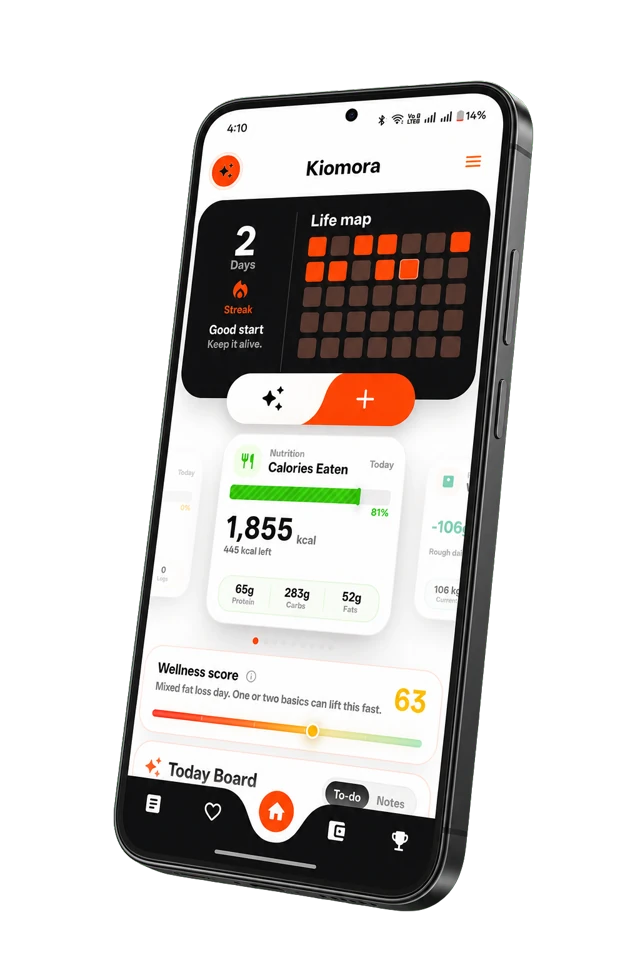
Kiomora for daily context
Your life, connected
Keep habits, wellness, spending, notes, and memories together so the details stay useful later.
Explore KiomoraA useful life log helps you find the details that matter later.
Everyday memory is selective and reconstructive, so many ordinary details become harder to retrieve as time passes. Ebbinghaus's foundational experiments studied learned material rather than proving a fixed forgetting percentage for lived experience, but they helped establish that recall changes over time.
Memory research also describes a "reminiscence bump": older adults often recall a disproportionate number of autobiographical memories from adolescence and early adulthood. That does not mean recent life simply disappears. It does show that autobiographical recall is uneven, selective, and shaped by how an event is cued.
External records can provide useful cues, but they are not a replacement for biological memory. Research on wearable memory aids such as SenseCam suggests that reviewing captured images can support recall in specific settings. The evidence does not justify a promise of perfect memory for everyone.
Life logging apps act as prosthetic memory. But do they actually work? For forty years, the answer was mostly no. They were data graveyards where information went to die. But in 2026, the emerging AI life tracking category has fundamentally changed the math.
This is a disclosed editorial comparison of the life logging landscape in 2026. We look at the history, the science, the costs of excessive tracking, and documented product capabilities across capture, retrieval, privacy, and export.
Disclosure: We build Kiomora.
Kiomora is included in this article. We have intentionally highlighted situations where competing products may be a better fit depending on your goals, and we have explicitly listed Kiomora's current limitations alongside its strengths.
1. What is Life Logging?
To understand the tools, we must clarify the definitions. "Best life logging apps" is a search query with an identity crisis. Are you looking for a mood tracker, a diary, or a spreadsheet of your habits?
- Journaling (e.g., Day One, Apple Journal): The practice of reflective writing. It is primarily text-based, focused on emotional processing, and captures internal states.
- Quantified Self (e.g., Exist, Gyroscope): The practice of metric tracking. It focuses on numbers (steps, sleep hours, heart rate) and correlation analysis. It captures external data.
- Life Logging: The intersection of both. It is the systematic capture of multiple life categories - experiences, metrics, context, and emotion - with the goal of building a complete, queryable memory.
A pedometer is Quantified Self. A diary is journaling. An app that lets you ask, "How did my sleep correlate with my anxiety last month when I was working on that big project?" is life logging.
2. A Brief History of Lifelogging Failures
Life logging has repeatedly shown that capture and retrieval are separate problems.
Microsoft Research's MyLifeBits explored a personal store for documents, media, communications, and captured activity. SenseCam explored automatic image capture as a memory aid. These projects demonstrated the possibility of broad capture, but they also made indexing, review, privacy, and useful retrieval central design problems.
SenseCam research offers a more careful lesson than the idea that every archive becomes useless. In a clinical trial with a patient who had memory impairment, periodic review of captured images supported recall of events that had otherwise been difficult to retrieve. That was a specific use case, not proof that continuous capture benefits everyone.
The practical lesson is simple: capture has value only when the record can be reviewed, searched, understood, and safely maintained.
3. The 2026 AI Inflection Point
For decades, apps competed on input friction. The "best" app was the one that made it easiest to log data.
Between 2024 and 2026, three technological shifts fundamentally flipped the value proposition:
- Speech recognition: Better transcription reduced some typing friction and made voice journaling practical for more people. Transcripts still require review.
- Vector Search: Moving from keyword matching to conceptual matching (finding entries about "anxiety" even if you only wrote "feeling tight in my chest").
- LLM Retrieval: The ability to ask questions in natural language and have an AI synthesize an answer from thousands of disparate data points.
This created the Capture-to-Retrieval Value Flip. In AI journaling and modern life logging, value is no longer about how easily you put data in. It is about how intelligently the system lets you get data out.
The debate on Hacker News in early 2026 highlighted an advanced concept: applying the Ebbinghaus forgetting curve to AI memory. Not everyone wants perfect recall. As one commenter, SwellJoe, argued contrarily: "I think memory makes agents dumber and less useful." The best systems won't store everything at equal weight forever; they will implement tiered memory, allowing trivial details to decay while surfacing critical insights, just like biological brains.
4. The Backlash: The Case Against Lifelogging
We cannot review the apps without addressing the backlash. The contrarian argument against life logging is strong, evidence-backed, and fully valid.
- Tracking Fatigue: The compulsive pattern where tracking continues without providing new insight. The "Burn your Fitbit" movement arose because tracking became an anxiety-inducing chore rather than a helpful tool. The solution is not better tracking; it is less tracking.
- False Precision: Rating your mood as a "7.4" is false precision. Wearable sleep tracking is notoriously inaccurate for precise sleep staging. Correlation does not equal causation, and treating app dashboards as objective truth is dangerous.
- Memory Distortion: Barclay and Wellman found that false recognition of plausible non-events increased over time while confidence remained high. An AI summary can introduce a similar practical risk if a polished paraphrase is later mistaken for the original entry.
- Fading Affect Bias: Human memory naturally fades negative emotions faster than positive ones. This is a healthy psychological protective mechanism. Lifelogging every bad day in vivid detail may counteract this, preventing healthy emotional fading. Sometimes, forgetting is a feature you don't want to break.
- Privacy and Sousveillance: The cloud is someone else's computer. Even with E2E encryption, metadata exists. For audio logging, two-party consent laws make 24/7 capture legally hazardous. However, some users find extreme value in sousveillance (inverse surveillance). As Hacker News user lazide reported about being falsely accused and exonerated by their own footage: "Having done so, it completely changes the dynamic." The tradeoff is meaningful.
- Changing How You Remember: Psychological research shows that relying on photos or video shifts your memory from a first-person "field" perspective to a third-person "observer" perspective. Capturing your life from the outside can actually change the emotional intensity of how you remember it on the inside.
The best life logging apps mitigate these risks. They minimize fatigue, allow for nuance over precision, and respect data ownership.
5. How to Choose: The 2×2 Capability Matrix
There is no "#1 Best App" for everyone. Instead, we evaluate apps on a 2×2 matrix:
- X-Axis (Capture Breadth): How many types of life data can it record? (Text, voice, metrics, photos, mood).
- Y-Axis (Retrieval Intelligence): How well can you find and use the data later? (Basic search vs. semantic analysis vs. natural language AI querying).
Secondary axes to consider are Privacy (Local-first → E2E Encrypted → Cloud) and Export (Native Markdown → CSV/JSON → PDF → Hostile).
| App Category | Description | Examples |
|---|---|---|
| High Capture, High Retrieval | The ideal state. Broad data collection combined with natural language insights. | Obsidian (+ AI Plugins), Kiomora |
| High Capture, Low Retrieval | Data graveyards. Massive collection, but hard to extract meaningful answers. | Gyroscope, Pre-AI Day One |
| Low Capture, High Retrieval | Smart but narrow. Excellent insights on a very limited subset of data. | Exist, Reflect, Daylio |
| Low Capture, Low Retrieval | Basic journals. Simple text entry, basic keyword search. | Apple Journal, Journey (Free) |
6. Honest App Reviews
How this comparison was checked
Pricing, platform, privacy, and export claims were checked against official provider pages on July 13, 2026. This is a documentation-backed editorial review, not a hands-on performance test of every paid plan. Product details can change, so use the official links in the source section before paying.
1. Day One
Pricing: $0 / $49.99 / $74.99 per year
Day One remains the gold standard for traditional journaling. Acquired by Automattic, it has evolved into a robust, beautiful platform. The Gold tier introduces AI features, though they are primarily geared toward guided reflection rather than free-form life-data querying.
- Strengths: Beautiful interface, end-to-end encryption on all tiers, excellent cross-platform support (Apple Watch to Android), robust CSV/JSON export. Excellent voice transcription on Silver+.
- Weaknesses: AI features are reflective rather than analytical. It is fundamentally a text/photo journal, not a metric tracker.
- Best For: Users considering an established journal-focused workflow. Verify current encryption scope, pricing, platform support, and export behavior in the provider's documentation. See our AI comparison.
2. Obsidian
Pricing: Free core / $4-$5/mo Sync / API costs for plugins
Obsidian is not a lifelogging app; it is a Personal Knowledge Management (PKM) system built on local markdown files. However, with community plugins (like Smart Connections or Daily Notes), it becomes the most powerful life logger in existence for technical users.
- Strengths: Direct data ownership. No cloud lock-in. Unparalleled customization. You can build exactly the retrieval system you want.
- Weaknesses: Steep learning curve. Setting up AI features requires bringing your own OpenAI API key and managing technical configurations. Mobile experience can be clunky.
- Best For: Power users who prioritize complete data ownership and customization above all else.
3. Exist
Pricing: $6.99/mo or $62.90/yr
Exist is one quantified-self option built around connected data sources and statistical review. Integration availability and supported services can change, so verify the current list directly with the provider.
- Strengths to verify: Statistical summaries, privacy controls, and the current integration catalog.
- Weaknesses: Almost purely metric-driven; not built for narrative journaling or voice capture. No AI natural language retrieval.
- Best For: Users who want rigorous correlation analysis and pattern detection across disparate data sources.
4. Daylio
Pricing: Free with optional Premium features. Store pricing varies by region.
Daylio eliminates the blank page by using a micro-journaling approach: pick a mood, tap an icon for activities, and you're done in two seconds.
- Strengths: Very low input friction, private local storage by default, and clear mood and activity charts.
- Weaknesses: Narrow capture breadth (mood/habits only). Export is limited to PDF/CSV without deep conceptual extraction.
- Best For: People who have failed to keep a journal before and need the lowest possible friction to track their mood.
5. Apple Journal
Pricing: Free on supported Apple devices.
Apple's native entry uses on-device machine learning to suggest moments to journal about based on your photos, workouts, and locations.
- Strengths: Low setup, deep Apple integration, text search and filters, audio recording with English transcription in supported locales, and entry export or PDF workflows.
- Weaknesses: Apple ecosystem only. It does not document semantic question answering across entries or cross-category life analytics.
- Best For: People on supported Apple devices who want a built-in journal with prompts, media, search, and straightforward export.
6. Gyroscope
Pricing: Free app, Gyroscope One at about $1 per day, and Gyroscope Max at about $3 to $8 per day.
Gyroscope combines health tracking, wearable sync, reports, food logging, and coaching in an iPhone-first product.
- Strengths: Broad health tracking, wearable sync, reports, nutrition tools, and optional AI or human coaching.
- Weaknesses: A modern iPhone running iOS 18 or newer is required. Coaching plans are substantially more expensive than a simple journal or tracker.
- Best For: iPhone users who want health tracking and coaching in one system and are comfortable with the membership cost.
7. Journey
Pricing: Journey lists Annual Membership at $4.17 per month when billed annually. Regional and one-time platform purchases can vary.
A classic, reliable timeline journal that exists on almost every platform imaginable.
- Strengths: Available on iOS, Android, Mac, Windows, Web, and even Chrome OS. Good media support.
- Weaknesses: Journey documents optional end-to-end encryption, but enabling it disables search because the service cannot index encrypted entries. Odyssey AI limits also depend on membership.
- Best For: Users who constantly switch between different operating systems (e.g., Android phone, Windows PC, Mac laptop).
8. Reflect & Capacities
Pricing: Reflect ($10/mo), Capacities (Free / Pro)
These two are primarily networked note-taking apps, but they excel at logging daily notes with AI assistance.
- Strengths: Reflect offers E2E encryption and excellent voice transcription. Capacities offers object-based organization and AI search across notes.
- Weaknesses: Designed for knowledge work, not life logging (health metrics, sleep, mood tracking).
- Best For: Professionals blending personal reflection with their PKM systems.
7. Kiomora's Place in the Market
The clearest example of an app built retrieval-first is Kiomora. While most apps force you to log text and metrics separately, Kiomora uses an AI-first approach to bridge journaling and Quantified Self.
You speak or type a single, free-form entry (e.g., "I had three coffees, went for a 5k run, and felt wired by the evening."). Kiomora can turn that into reviewable food, activity, and note logs before you save them.
The differentiator is Ask Kiomora, which provides natural-language retrieval across saved logs. You can ask, "When was my best sleep week?" or "How many coffees did I log this month?"
- Verified Strengths: Built-in retrieval across structured life data. Voice journaling with transcription. Multi-category capture from a single entry. Manual tracking, Ask Kiomora, weekly reports, and monthly reports are free.
- Verified Limitations: Plus users can retrieve supported records through an authorized MCP client, but a complete self-service account archive is not currently available. Kiomora uses Firebase with encryption in transit and at rest, but does not offer zero-knowledge E2E encryption. The service has not been independently audited at large scale.
- Best For: People who want a high-capture, high-retrieval workflow for saved daily context without the technical setup of Obsidian.
8. The Converging Frontier
No single app is perfect. If you want strong privacy, you give up server-side AI retrieval. If you want zero friction, you give up depth. If you want correlation analysis, you give up emotional journaling.
However, the frontier is converging on the upper right quadrant: High Capture + High Retrieval. Obsidian approaches it from the technical, local-first side. Day One Gold approaches it from the premium journaling side. Kiomora approaches it from the AI-first, multi-category side.
The ideal life logging app of 2026 is not a database you manually curate. It is a system that listens, organizes, forgets the noise on purpose, and answers you intelligently when you ask.
9. Frequently Asked Questions
What is life logging, and how is it different from journaling?
Lifelogging combines capture and retrieval across multiple life categories (metrics, context, emotion). Journaling is reflective writing, usually text-only. Lifelogging aims for completeness; journaling aims for reflection. They overlap but aren't the same.
Is life logging worth it?
It depends on what you're trying to achieve. If you want to remember your life in detail and retrieve insights later to solve the "now what?" problem, yes. If you just want to feel more reflective in the moment, a basic journal is enough.
What's the best free life logging app?
Apple Journal is a built-in option on supported Apple devices. Daylio offers simple mood and activity check-ins. Obsidian is strong for people willing to build a local-file system. Kiomora is available on Android and iOS for natural daily logging and saved-log retrieval, with Monthly Reports also accessible on the web.
Can AI help me remember my life better?
AI can help with search, summaries, and natural-language retrieval, but every answer should point back to the original entry. Research on autobiographical memory shows that people can confidently accept plausible altered details. Treat an AI summary as a convenience layer, not as the authoritative record.
Is my life log private?
It depends fully on the app. The privacy spectrum ranges from Obsidian (local-first, no cloud required) to Day One (E2E encrypted on all tiers) to Kiomora (encrypted in transit and at rest via Firebase) to fully cloud-based systems. Cloud storage always involves some trust in the provider.
Can I export my data if I switch apps?
This is critical. Obsidian uses native markdown (no export needed). Day One ships CSV/JSON. Exist exports CSV. Daylio exports PDF/CSV. Kiomora Plus supports limited retrieval of supported records through authorized MCP clients, but not a complete self-service account archive. Always check export capabilities before committing years of data to a platform.
What's the difference between Quantified Self and life logging?
QS tracks metrics (steps, sleep, heart rate); lifelogging captures experiences (text, photos, voice, context). QS is data-centric; lifelogging is experience-centric. Exist is QS; Day One is lifelogging; apps like Kiomora bridge both.
Will lifelogging give me anxiety?
Tracking fatigue is real. The compulsive pattern where tracking continues without insight often leads to anxiety (the "Burn your Fitbit" backlash). Start small. Track only what you will actually review.
Is forgetting actually good for you?
Forgetting is a normal part of memory, and research on fading affect shows that the emotional intensity of unpleasant memories often declines faster than that of pleasant memories. That does not prove that keeping a journal is harmful. It is a reason to review difficult entries thoughtfully instead of treating permanent recall as an automatic good.
What about always-on audio recording?
Always-on recording raises severe privacy and legal issues (two-party consent laws). Furthermore, the Hawthorne effect means people act differently when recorded. Most 24/7 lifeloggers scale back to specific contexts because total capture is psychologically unsustainable.
Can I use AI to chat with my life log?
Yes, but in different ways. Day One Gold offers guided reflection chat. Obsidian (with the Smart Connections plugin) allows free-form chat but requires an API key. Kiomora's 'Ask Kiomora' provides built-in natural language retrieval across structured life data.
What's the cheapest way to start?
There are several low-cost or free options: Apple Journal (iOS), Daylio (mood), and Obsidian (free core). Check Kiomora's current App Store or Google Play listing for current plans and availability.
What if I already have years of journal entries?
Import capabilities vary widely. Obsidian accepts markdown natively. Day One has import tools. Most QS apps don't import text journals well. Switching costs are real, so choose your format wisely.
Is lifelogging safe for mental health?
A life log is not mental-health treatment, and the effect can differ by person and practice. If tracking increases rumination, anxiety, or compulsive checking, reduce the scope or stop. Consider what you record, how often you review it, and whether the routine is helping.
What's the one app you'd recommend?
We refuse to give a single answer because it depends fully on your needs. Use the 2×2 framework above to decide if you prioritize writing, metric correlations, privacy, or AI retrieval.
10. Sources and Verification
Research and product details were checked against these sources on July 13, 2026. Product pages can change, so confirm the current offer before paying.
- Barclay and Wellman: autobiographical-memory accuracy, false recognition, and confidence
- Munawar and colleagues: systematic review of the reminiscence bump
- Fading affect research: review and references for differential emotional fading
- Microsoft Research: SenseCam as a retrospective memory aid
- Day One: plans, encryption, platforms, audio, AI, and export
- Exist: integrations, correlations, platforms, and pricing
- Exist: privacy, deletion, export, API, and no-AI position
- Gyroscope: current products, pricing, and iPhone requirements
- Journey: membership, platforms, encryption, AI quota, and export
- Journey: encryption scope and the search tradeoff
- Apple Journal: search, filters, calendar, and location views
- Apple Journal: print and export workflows
- Apple Journal: media, audio recording, and transcription
- Obsidian: current core and sync pricing
- Daylio: current product features and platform links
Common questions
Practical answers before you begin
- What is the best app for tracking everything in one place?
- There is no universal best app. Decide first whether you need a flexible database, a health or symptom tracker, a journal, or a low-friction daily record. The right tool is the one you can keep using without turning your life into admin.
- Should I use one life logging app or several specialist apps?
- Use specialist apps when depth in one domain matters. Use a combined record when you mostly need to remember everyday context across categories. Many people keep both: a specialist tool for details and a simpler daily log for the story around them.
Don't forget to try Kiomora
See more thanone detail
Keep the useful parts of each day in one record you can return to.
Explore Kiomora